
# Advanced Calibration
# Pressure compensation Calibration
Documentation pending: This feature or topic is not yet documented. Details and instructions will be added in a future release.
# Bed Mesh
Documentation pending: This feature or topic is not yet documented. Details and instructions will be added in a future release.
# Bed Tilt
Bed tilt compensation is a feature that allows you to adjust each Z-axis motor to ensure that the bed is not tilted. This is important for ensuring that your prints have a consistent thickness and that they adhere properly to the bed.
# Prerequisites
- Multiple independent motors for the Z axis
- One of those probing sensors:
- A capacitive connected to an endstop input on the Aurora.
- A laser (Keyence IL-1000 or LK-G5001) connected to a Laser Submodule on the IO Module
# Configuration
- Probe configuration
- Capacitive sensor
No configuration is required for the capacitive sensor. - Laser
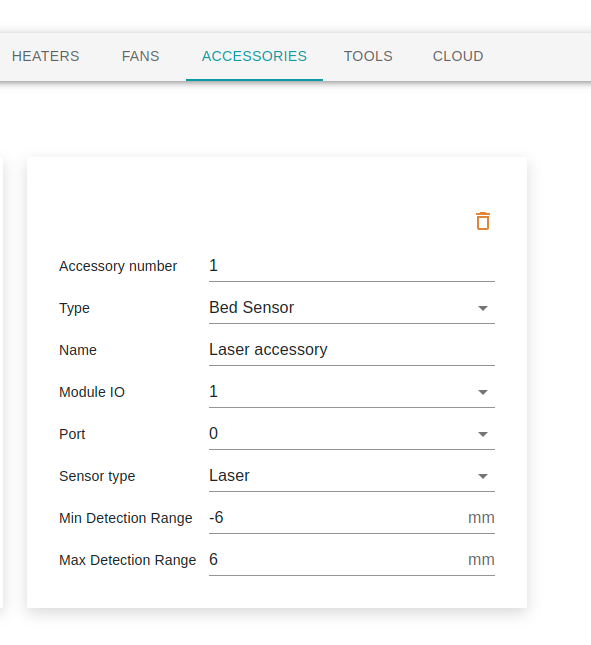
In the Accessory tab, create a new Bed Sensor, enter the Module IO and port where it is connected. Select Laser as the Sensor Type and enter -6mm to 6mm range.
- Capacitive sensor
- General Configuration. The speed of the movement between the probing points is the default speed configured in the System>Configuration>General> Default speed.
- Configuration in bed mesh. A few configurations required in the bed tilt compensation comes from the Bed mesh configuration window. Available in the System>Configuration>General> Bed mesh <Edit>, you should enter the following fields
| Scan height | The height where the movement is done between probing points. When using a laser, it is also used to read the laser value. It should be as close as possible to the zero value on the laser, allowing free movement without the tools interfering with the bed. When using a capacitive sensor, the scan height parameter needs to be set at a level that prevents accidental triggering of the capacitive sensor when moving between probing points. |
|---|---|
| Probe speed | This is the speed of the Z axis when getting the sensor closer to the bed to activate the sensor and obtain a height reading. The slower the speed, the more precise the reading will be. This ensures that the sensor has sufficient time to register the change in capacitance and provide an accurate measurement of the bed's height. This parameter is not used when using a laser. |
| X axis offset | The x axis offset is the difference between the tool's X coordinate and the sensor's X coordinate at the same height. Offset = Sensor X - Tool X Example: Tool at 20, Sensor at 25, Offset = 5 Tool at 20, Sensor at 15, Offset = -5 |
| Y axis offset | The y axis offset is the difference between the tool's Y coordinate and the sensor's Y coordinate at the same height. Offset = Sensor Y - Tool Y Example: Tool at 20, Sensor at 25, Offset = 5 Tool at 20, Sensor at 15, Offset = -5 |
| Probe endstop input | The endstop input for a capacitive sensor or the laser accessory. |
| Input type | If an endstop input is used, this field indicates if the sensor is Normally Open or Normally Closed. |
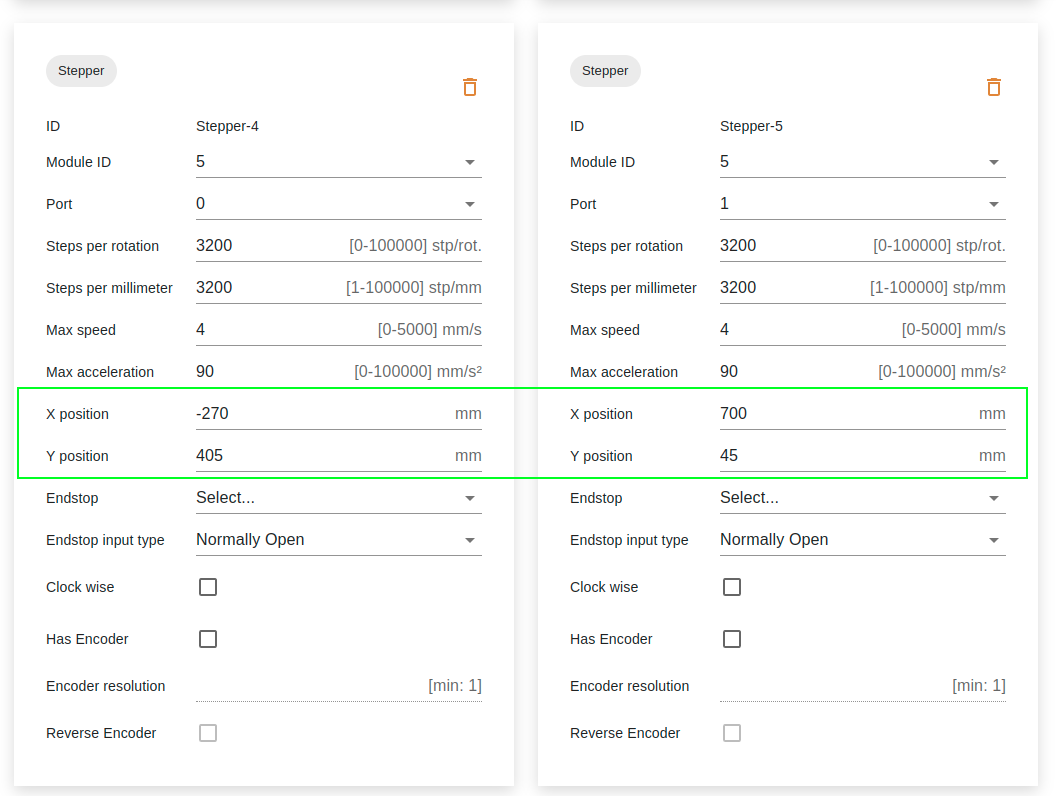
- Z Motor positions to be able to apply the right tilt compensation, a X/Y position should be configured on each Z axis motor. This coordinate can be negative and outside the limits of the axis.
- Macros
The G32 bed tilt compensation macros configure the probing sequence. The number of probing points should match the number of motors on the axis, with one point positioned as close as possible to each Z axis motor. The final point should include the Sn parameter, which specifies the number of points used in the calculation. This parameter instructs the system to calculate and apply the offset to each Z axis motor.
G30 P0 X-60 Y30; probe left side
G30 P1 X-60 Y425 ; probe right side
G30 P2 X330 Y425 ; probe right side
G30 P3 X330 Y30 S4 ; probe right side
# Usage
- Home all axes. (G28)
- Call the bed tilt compensation macros (G32).
Add bed tilt compensation G-code (G28, G32) to your slicer's start G-code script to ensure the bed is level for every print, improving quality and reducing failures.